Thursday, August 27, 2015

Goodbye Pictage - Now What?

Even if you've never been a Pictage member, it's important to note how this closure affects your colleagues, and to be aware that this is always a possibility with any service that you use as a key partner in your business.  For those who haven't been in the loop already, Pictage announced their final closure for Sunday, September 27th, 2015.


Pictage basically helped me launch my business over 10 years ago and I came to rely on them for nearly everything that happened on the back end of my wedding & portrait business.  Billing, hosting, cloud storage, FTP solution to vendors, printing, album designs, customer support, print orders, packaging, drop shipping, credit card transactions, marketing promotions, etc.

Technology has changed a lot since that point.  There were no iPhones 10 years ago.  Twitter didn't exist.  Facebook was just starting as a way for Harvard students to network with each other.  Digital SLRs were just starting to become affordable for the average consumer with a whopping 6.3megapixel files.  Amazon cloud storage didn't exist yet, but Pictage had created an incredibly advanced online solution for film and digital photographers to serve their clients.

The last year has been the worst year for Pictage.  Some people jumped ship early, but I hung on for quite a while, until I finally had a chance to move my archives to a new cloud solution.  The nail in the coffin for me came when Pictage separated off the free album designs and instant wholesale album ordering along with completely removing the one-on-one support for Pro accounts and the raised credit card rates.  Those were the last remaining advantages that Pictage had over many other services, and when they decided to remove those, I decided it was no longer worth keeping.  I upgraded my systems elsewhere and hired an assistant to help take care of the cloud file transfers via FTP from Pictage to Dropbox using MutlCloud.  I'm now finally ready to say goodbye as well and here's how I've changed my business to accommodate not using them anymore... (this is not a recommendation as to what anyone else should use, just my personal choices and examples).

Proofing: PDF of proofs created from the Print module in Lightroom emailed or Dropboxed to clients, which works out better for my commercial clients, since it allows them to keep and store the PDF for future image orders or sharing with suppliers who may also want commercial usage of images.  This allows them to mark any retouching or alteration requests directly on the document to return to me for editing.  If you plan to sell prints online to clients or friends and family of clients, you'll want to consider an online proofing solution mentioned below.

Invoicing, Billing, Contracts, Project Mangement: If you don't plan to have a proofing solution with built-in billing services, check out 17Hats.  It has been super easy to use, very quick to set up, and it facilitates creating as you go so that you don't have to have it all figured out or set up at once.  You can just use what you need first and then add on from there.  It accepts all major credit cards as well as PayPal and adds no additional credit fees.

Printing & Albums: Most of my commercial clients are doing their own printing or sending directly to magazines for publication and require no printed products.  If my former wedding clients were to want prints or albums at this point, I would still be able to source through the highly experienced team and great quality products at Photo Albums Direct, but would also consider many of the other options out there as well.

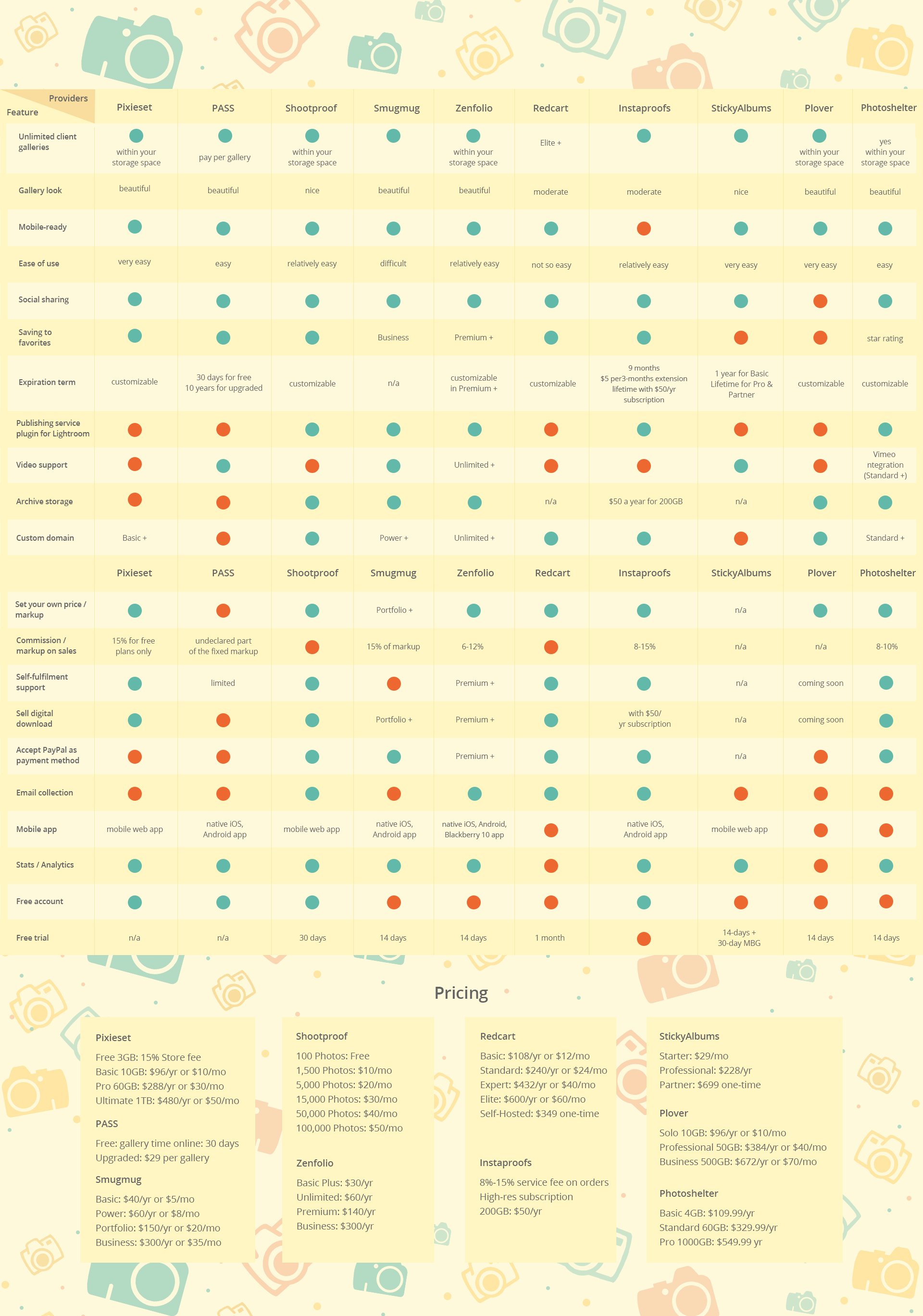
If you really need a new proofing solution, I think Julia May did a great job of comparing various online proofing and hosting solutions, so if you haven't chosen a next step yet, or are shopping the market for something better than what you have, check out her post here to compare some of the most used services currently available (chart is from the post linked below):
http://petapixel.com/2014/09/07/battle-client-galleries-comparing-10-best-tools-image-proofing-presentation/

Tuesday, August 18, 2015

Business Burnout - Ways to Recover

This year I've seen another round of my peers reach a point of serious business burnout.  Working to the point of exhaustion and losing the joy in their creative work.  I totally get it, I was there once too.

At the time, I wanted to give all of it up and find a completely different career.  I searched high and low for something I thought I'd enjoy more.  I picked up some part-time teaching artist gigs to get back into the classroom and public school system in case I wanted a job there again.  I studied and took the MAT's in preparation for applying for a Master's Degree in a completely different field.  I considered the hundreds of other, easier jobs I could do for the same amount of money or more.  Nothing ever felt more awesome, but my business wasn't feeling awesome either, and I felt like I was just getting sicker on a bad carnival ride that never ended.

I learned that by scaling back and doing something else for a while, even just part time on the side, and putting myself in a position of only taking clients I really enjoyed working with, that I was able to regain some of my love back for my own business.  I became reminded of how much freedom I have to create my own schedule and take on as much or as little as I feel like I can handle, I was reminded of all the things that I disliked about working in environments where other people aren't as passionate about their work, and I really started to acknowledge that I didn't actually hate being a photographer or business owner... I just hated how I was running my business.

I had been letting my clients take over and push me around but the clients had very little to do with it.  I hadn't set appropriate boundaries or expectations that provided the space I needed to do the work in a way that didn't stress me out each week.  I had taken more work than I could handle, but didn't outsource or hire to make up for the increased workflow needs.  I had been a terrible boss: giving myself no days off, expecting me to be available to clients 24/7, and not hiring more help when I really needed it.  If I'd been working a traditional job, you can be sure that I would have quit under those working conditions!

Being a small business owner doesn't mean you need to be slave to your business or your clients.  Your clients benefit more when you have the energy and creativity that comes with being well-rested, taking days off each week, making enough time for self-care each day.  You're happier, you're healthier, and little problems bother you less because your bucket isn't overflowing with stress.

When you learn how to take back the control you've had all along, but unintentionally had let slip out of your hands, you start gaining some of your joy back in your career and your life.  A lot of it starts with setting appropriate business expectations and acting accordingly.  That means, if you declare your working hours are 10am - 6pm, you literally turn off your computer and don't accept business calls after 6pm.  Period.  You don't open up your computer by your bedside at 9am.  You get up, take a shower, have some breakfast, and get ready like normal people before you open your computer.

That immediate response time is only expected when you make it a regular habit.  If you begin your client relationship by letting them know how long it generally takes to respond to emails and phone calls, than they can have more appropriate expectations up front.  I tell my clients that email may take 48 hours and I don't usually answer it on the weekends, but phone calls can usually be responded to within the next business day.  Just because they're thinking of some question at 11pm at night, doesn't mean I need to respond to them at 11pm at night.  To help make this easier for myself, I completely removed email from my phone.  If I'm on location, I'm not trying to answer emails on my phone.  I'm far more likely to write something rushed and mistaken when I'm trying to respond between travels and clients than if I put myself in a collected and thoughtful place behind my computer.

When you start taking back your life, you plan vacations and get togethers with friends and family and schedule them into your calendar so that you aren't tempted to schedule every weekend with no recovery.  You decide that there will be no shoots on Monday or Wednesday (or whatever days work for you) because you need a couple office days to catch up on email and post production and you want to get to the gym those nights.  You hire and outsource tasks that you're always procrastinating on, because you recognize that your time and stress level are more important than something someone else can do for $15-$20/hr.

You may have to take a break for a while to be reminded of all the things you love about being in business for yourself.  Of course, if you take a break and find something else far more freeing and awesome in the meantime, than isn't that a better situation than being stuck in a cycle of stress and burnout?

If you can't even fathom taking a break (especially in the middle of the season), start simple by implementing one new boundary or rule at a time.  Like declaring Monday is always a recovery day, or no email in bed, or portrait shoots only on Tuesday and Thursday.  Practice it for several weeks before adding another.  Allow yourself room to mess up and try again.  Be real with yourself when you're putting your mental and physical health on the back burner to serve a client, and then find ways to make up for it in the week ahead by taking a day off, scheduling lunch with a friend, or scheduling more gym time- whatever helps you get your groove back and feel more like a human than a slave again.  As you gradually reclaim the time and space you need to feel rested and recharged each day and each week, you'll gradually get yourself back to a place where you love owning a business again because you're really in full control of your schedule and your life again.

For more related posts see:

How to Stop Running Behind & Feeling Overwhelmed
http://photolovecat.blogspot.com/2012/03/how-to-stop-running-behind-feeling.html

What WON'T You Do?
http://photolovecat.blogspot.com/2012/04/what-wont-you-do.html

Hire a Remote Photo Assistant
http://photolovecat.blogspot.com/2012/03/how-to-hire-remote-photo-assistant.html

Anne Ruthmann is a professional photographer in New York City. With over 10 years of success as a full-time photographer in weddings, portraits, editorial, and now architecture and interiors, she spends any extra time she has helping others find smart solutions to business problems. Stay in touch on Instagram, Twitter or Facebook.

Friday, July 24, 2015

Handling Late or Missed Payments

If you've never had a client miss a payment deadline or bounce a payment, either you've been incredibly lucky, or you simply haven't been in business long enough.  Into every business owner's life a little late or missed payment will fall.

It's always best to approach this situation with the mindset that your client really does want to you pay you, but for whatever reason, life has gotten in the way and something slipped through the cracks.  Do not assume the worst before you've given your client plenty of time to resolve the situation.  Start the conversation with openness and understanding, having total faith in your client- this will take you much further than starting off with defensiveness and a combative attitude.

Hopefully you've set up your payments in such a way that final product is only delivered upon full receipt of payment being cleared so that you aren't giving your work away before it's been fully paid for.  If you've already provided your final work before receiving final payment, you may feel a little more antsy and defensive about the collection process, but you still need to approach it with the same level of professionalism and due process.  Chalk this one up to a learning experience in changing your policies so that you aren't in a situation of giving away your work before it's been paid for.

Step 1:  Email a payment reminder (ASAP)

As soon as possible after the missed payment, email a payment reminder with the scheduled due date that was missed.  If you haven't specified a late payment agreement with a fee, provide a grace period.  Offer the client multiple payment options and a direct link if possible to making the missed payment online with a credit/debit card, and offer a deadline by which you expect the payment to be resolved.

In this email, it's also good to state that a $$ late fee will need to be billed for any payments that need to be paid more than ## days after the payment deadline.  This both helps to incentivize quicker payment, as well as providing proof of notice that a late fee was announced for delayed payment processing and continued follow-up on collecting payment.

It's good to allow a full 14 days from payment due date in the event that the client is on a bi-weekly salary schedule, and to give them enough time to resolve any issues with their bank, or time to borrow money from family and friends if necessary.

Here's a sample email:
"Hi Jennifer,

We're looking forward to working with you and wanted to make sure that you had an opportunity to make the payment that was due on January 10, 2015 for the amount of $5,000.  We totally understand that sometimes life gets in the way and sometimes things slip through the cracks.  As a courtesy to you, no additional late fee will be charged if payment can be made before January 24, 2014.  

You're welcome to pay by check, mailed to: 123 Street Ave, City, State, Zip, or by Debit/Credit/PayPal using the link below:  http://linktoinvoice.com

We'll send confirmation as soon as payment has been received and cleared our accounts.  Please note that any payments received after January 24, 2014 may have additional late fees added to the invoice to cover our time and additional service to continue following up on payments not yet received.  

Please email or call us if you feel you need additional time, or have questions about this missed payment: 800-888-88888

All the best,
Service Provider"

Step 2:  Send A Second Email Reminder & Phone Call (7 Days)

If you don't receive payment or response within a few days of your first notice, prepare to send a second notice and make a phone call a few days before the grace period ends.  It's important to make a phone call in order to confirm that all of your emails have been received by the client.  They could be in another country, or their email may not be working, and all payment requests you've sent may not have gone through.  It's important to continue giving the client the benefit of the doubt, until you've confirmed the client has definitely received any of the information that you've sent so far.  In your follow-up email, note that the deadline to pay without additional fees is coming up and you'd like to help your client take care of this as soon as possible.

In your phone call, ask for confirmation about the receipt of the email, and offer to take any payment options over the phone so that it can be taken care of right away.  If you have to leave a message, state that a paper bill will be sent with an additional late fee if payment isn't received by the grace period deadline provided over email.  Thank them for their business and let them know that you really enjoy working with them and totally understand that sometimes things happen, and you want to help them resolve the situation easily.

Step 3: Mail a Paper Invoice After Grace Period (14 Days)

If two weeks have passed and payment has still not been received, it may be time to send a written invoice for the payment.  Again, it's best to give the client the benefit of the doubt.  Perhaps someone ended up in the hospital, or they were on an extended vacation, or who knows what else could have happened.  You'll feel really terrible if you start attacking your client when their spouse or parent just died and they're having a hard time coping with life in general.  Be human.  It goes a lot further toward gaining repeat business and new clients than being a jerk.

In paper, send a copy of the contract, a copy of the emails sent, and notice of when you called.  Just document it all and share the documentation.  Write a letter showing that you're concerned you haven't heard from them and you're willing to set up a payment plan if that is needed.  Offer multiple ways to help your client honor their commitment.  Call within a few days of mailing your letter, once again, to talk on the phone and help create a solution.

Step 4: Determine Your Next Steps (30 Days)

If a client has gone completely missing after 30 days with zero response to any of your attempts to get in touch and resolve the bill, you will need to consider if you can ride out another 30-60 days of sending notices by email, phone, and mail every couple weeks before taking any legal steps.

It's in your best interest professionally and legally, to attempt to resolve any bill collection on your own before attempting to engage the courts or a lawyer.  A lawyer may make the case that they should be involved immediately, but you'll have a much stronger case for any additional fees above and beyond your original contract if you demonstrate how much time you put into attempting to resolve the issue on your own expense first.  I think 90 days is a good amount of time to help a client directly resolve any financial issues, especially if those issues have come about because of death, unemployment, or other sudden life changes.

If your client has remained unresponsive, than you will need to determine your next step of action.  Is this a small claims court issue, something a collection agency can help with, or is this substantial enough to engage legal representation for?  Will the amount for the service you pursue exceed the amount owed?  Consider all of your options before deciding which one may be best.

Anne Ruthmann is a professional photographer in New York City. With over 10 years of success as a full-time photographer in weddings, portraits, editorial, and now architecture and interiors, she spends any extra time she has helping others find smart solutions to business problems. Stay in touch on Instagram, Twitter or Facebook.

Wednesday, July 1, 2015

How to Schedule Appointments Faster

How annoying is it when you need 20 emails to nail down 1 appointment?
OMG.. please stop killing me with email tag just to set up an appointment!
Make a decision so we can all move on with our lives!
BIG peeve of mine.  I really despise wasted time.

Here are a few strategies to STOP wasting your time and get clients and appointments quickly scheduled into your calendar.  These are most effective when you do them right away with a client to help move the client from indecision to decision.  By providing options to meet and discuss details in your initial email, you quickly create action toward closing a sale as soon as possible.

Option A: Provide 3 Specific Date & Time Options

Example:
"I'm so excited to photograph XYZ for you!!  I'd love to meet you over Skype or in person to chat more about XYZ.  Here are the next 3 chances I have to set up a 60min meeting, what works best for you?
3pm Wednesday June 2,
6pm Thursday June 3,
or Tuesday 10am June 8
Thanks,
Anne"

Benefit: 
You control your schedule, you determine when the best times to meet are, you set the expectation of how long the meeting will be, and you provide very specific dates and times that can immediately be checked against the other person's calendar.  It moves the process forward quickly and efficiently to the end goal.  If clients can't make any of those times, they will usually just tell you.  If they go radio silent, it's easy to follow up with, "I'm still looking forward to meeting you!  Here are a few more dates and times that work- and if you need an alternative time, just let me know what works better for you?"  People like to know they've responded appropriately to email, so giving a very specific action item to respond to makes it easier than creating an open-ended situation with no specific response needed.

Option B: Use a Scheduling Software

Example:
"I'm really looking forward to photographing XYZ!  In order to make sure we're on the same page about everything involved, I'd like to set up a time to chat.  Click on the link below to find a time in my calendar that works best for you to schedule 60 minutes to meet in person or over Skype:
http:linktoaschedulingsoftware.com"

Benefit:
If you can't be bothered to look at your calendar and prefer that an online system manage your life and your schedule for you, this is a great option and can even be an automated email that you send along with a price-list.

Appointment Scheduling Softwares:
There are many scheduling softwares out there, some are free, some are paid- but before choosing one- make sure it has all the options you really need.  Ask yourself these questions before deciding:
1. Does it sync with the calendar system you use most often?
2. Does it allow you to block off times when you can't schedule appointments?
3. What information does it allow you to collect when setting the appointment?
4. Does it provide reminders or alerts to you AND the client?
5. Are the appointments and info available offline if needed?
6. Does it need to collect payment for appointments, or integrate with any other payment systems you prefer to use?

Option C: I've tried everything else and nothing is as effective as A or B

Every other method I've tried has always resulted in far more emails and indecision than when I've just said here's what I've got for you- what can fit your schedule?  Clients deeply appreciate that I am not wasting their time with additional back and forth emails.  Clients also appreciate my time more when they see how limited it is by only providing very specific days and times to meet.

I prefer Option A because it's always based on what my schedule looks like right now at this point in time.  I've had mixed success with online calendar systems.  The worst thing is when you set up a recurring calendar with the hope that this will help you streamline everything so you can send an automated response, but because your schedule changes frequently and sometimes you forget to update the software's calendar, haven't had a chance to put something important in your calendar, or it doesn't sync properly with your calendar, someone may end up scheduling a time that you're actually not available and then you have to go through a rescheduling process.

Another alternative that I did not mention, but seems to work well for a friend of mine is to hire a Virtual Assistant to make scheduling on your behalf with access to your calendar.  This is only effective if your clients tend to answer the phone.  Not all do, which is why I continue to prefer Option A or B.


Anne Ruthmann is an editorial & event photographer in New York City. She spent 10 years practicing marketing & management in corporate and non-profit businesses before pursuing her passion for photography full-time in 2004 as an independent small business.  She loves helping others find creative and smart solutions to business problems.  Stay in touch on Instagram, Twitter or Facebook.

Wednesday, June 24, 2015

Offering Photography Internships : Dos & Don'ts

There are people in your immediate area who are hungry to learn the craft of photography, design, freelancing, or being a creative entrepreneur without making the financial investment in a school program.  They're willing to commit 6 months of their time, once or twice a week for several hours, to learn the craft, art, and business of photography.  I've been amazed by how many applications I receive for internships, and that they far exceed the number of applications I receive for PAID positions!  It baffles my mind, really, but it also demonstrates that there are many people who are very hungry to learn from you and want to do it in a low-risk exchange for their time.

If you've never done an internship yourself or hired an intern, I suggest brushing up on what the US Department of Labor considers an internship and how it's different from a paid position:
http://www.dol.gov/whd/regs/compliance/whdfs71.htm

Essentially, an internship is always of greater benefit to the intern than it is to the company.  In my experience, and in the ways that I've designed my internships, this is definitely true.  I don't gain any additional time from taking on an intern, I simply trade the time I give them for the time they give me in return and it ends up being a net zero on my time.  In many ways, I'm mentoring my potential competition.  I get a few extra hands, but those hands may also come with a lot of time explaining things and quite a bit of hand-holding.    Ultimately it is a mentoring relationship, and you have to honor that relationship by really treating it as a learning experience.

What I have gained from having interns in my business is a better understanding of who I am as a photographer and a business owner.  If you're a reflective business owner always striving for improvement, you can't help but learn a lot about yourself in the process.  You'll learn what tasks you can give to someone else, and what tasks are critical for you to retain control over.  You'll learn what you can train someone to do and what is so innate and difficult to train that you have to pre-select someone for (like their visual aesthetic).  You'll learn how much you can or can't rely on others and when it's best for you to handle a situation versus anyone else.  It's a great way to figure out exactly what you need to hire skilled people for and what you can share with someone who's still learning.  If that's something you're interested in, read on about what to do and not to do regarding interns:

DO:

  • Have an application process and deadline for applications.
  • Post your internship opening on your blog, Facebook page, and in your newsletter.  Start with the people who already know you and follow your work, as they are your best referral source for finding talented people near you.
  • Set a regular time and date for the internship to take place, either decided and advertised in advance, or negotiated with your intern after they've been selected.  I've found that a 3-6month commitment is a good period of time for an internship and that 4-8 hours per week is ideal.
  • Consider how much travel cost will be involved for your intern and make the arrangements easier on them when possible.
  • Be flexible with interns, but also have defined cancellation notice periods for both you and the intern in case changes need to be made last minute.
  • Create an agreement that defines the days, times, cancellation policy, non-disclosure agreement, and basic expectations of the internship so that there is something in writing that outlines the expectations.
  • Offer to cooperate with schools and universities that need documentation for the internship.  It's often just a series of surveys about the student and a few paragraphs about their work with you.
  • Have regular check-in points during the internship to make sure the student is learning what they came to learn, and that you are providing that for them in the experiences and tasks you share.
  • Offer internship perks like borrowing equipment, going on important assignments, and reviewing proposals or client emails that deal with tricky situations.
  • Feed interns.  Don't hold them hostage for more than a few hours without feeding them.  Hangry interns make very cranky office mates.
  • Create additional space for an intern to share your desk or your office. Whether you work from home or from a studio space, just create a little extra space.  Creating a space helps interns know that they are special and important to you.  Warm fuzzies make happy office mates.
  • Allow interns to understand the financial aspects of running a business.  When this information is hidden from them, they may walk away with a glamorous view of what it's like to be a freelancer without understanding the real costs and expenses.  If you're at all concerned about your intern becoming your competition, sharing the financial realities makes it more clear as to whether they'll pursue photography as a hobby, business, or work for someone else.

DON'T:

  • Give an intern essential tasks in your business.  Not only are you setting them up for failure if they don't have the experience or training, but you're also putting your own business at risk.
  • Hide information from interns.  Trust is essential in this type of working relationship.  A non-disclosure agreement should be all you need to establish a code of trust between the two of you.  The more they learn about the business, the better informed they'll be in all of their future photography decisions, which creates a healthier photography community in general. 
  • Expect an intern to pick-up understanding just by watching you.  You need to explain a lot of what you're doing, how you're doing it, and why you're doing it along the way before an intern can really understand how to do something for you.
  • Lose patience.  Your professionalism toward your intern is just as important as your professionalism with your clients, and your intern will share the emotional experience of with you well beyond the time you spend together even if they disclose nothing about your business.
  • Take an intern for granted by expecting an intern to do something you'd normally pay someone else to do.  If you'd normally pay for it, you should be paying your intern for that task as well.
  • Forget that an internship is a mentorship not an apprenticeship.
  • Assume that every intern is going to turn around and create a full time business with what they've learned.  Many don't become your competition because they see how steep the learning curve really is once they've had a chance to experience it at the fullest.  Sometimes knowing more actually means that people decide being a photographer isn't the right thing for them, and your internship is a way for them to experience that without making a huge investment in gear, mistakes in their own business, or in an education that doesn't result in a job opportunity.
  • Get upset if they do become your competition.  If you can, try to hire them if you feel like they're a great fit, and hopefully you've educated them about why it's easier for them to work in your business than to go out on their own.

Anne Ruthmann is an architecture & lifestyle photographer in New York City. She spent 10 years practicing marketing & management in corporate and non-profit businesses before pursuing her passion for photography full-time in 2004 as an independent small business.  She loves helping freelancers find creative and smart solutions to business problems.  Stay in touch on Instagram, Twitter or Facebook.