Showing posts with label email. Show all posts

Tuesday, May 28, 2019

Managing Expectations & Deadlines for Creative Work

Establishing deadlines and expectations for a creative service or product keep both the client and the creative happy in their working arrangements.  Without clear deadlines or expectations, the creative can infinitely revise their own work, or the client can continually expect service without an end point.  Many contracts outline the basics of payment expectations and deliverables, but a great creative working relationship will make sure to outline the following considerations before working together...

When the work will begin:
Let's say you have 10 projects on your plate and you can't even think about the client's project until the end of the month.  Discuss this in advance with the client, and what they can do to prepare themselves before the working arrangement begins so they aren't expecting you to be on call with their project right out of the gate.

When online or in-person meetings will happen for progress updates:
If your project has multiple steps that require client feedback or updates, establish a calendar of when those updates and check-ins will happen up front.  Get the dates into your calendar and into the client's calendar.  This way, even if your schedule or the client's schedule changes over time, you can renegotiate the check-in dates and expectations for updates and feedback.  Just having regular check-ins on creative work can help put a client more at ease than having nothing.

When middle parts of the project are due:
Consider the wedding photography internal deadline like the client family who needs engagement photos to send newspapers, or a framed photo order they want to place before the wedding.  Consider the website design client who may have a deadline for a landing page before the full site is ready, or a deadline for a product logo before the rest of the work is completed.  By discussing project deadlines that need to happen in the middle of the project, the creative creates more clarity around the process and internal deadlines that the client is expecting to have ready in advance.

When client contributions are due:
How many times have projects been delayed because the creative was waiting on the client to deliver something necessary for the creative to move forward?  By establishing client deadlines and expectations for contributions - AS WELL AS late fees and late consequence expectations for not delivering on deadline - the client and creative have opportunities to discuss the importance of the client contribution in advance of working together and signing a contract.  This also gives the client an opportunity to be better prepared to contribute in advance.

What are the communication expectations (video, phone, or email?)
In the age of a million ways to communicate, we now have to address HOW we should expect people to communicate with us.  If your client is a phone person and you hate talking on the phone as a creative, is the Video Call the next best solution for both of you, or do you need the client to send emails only?  What should the expected turn around response time be before a client asks if you received their email?  These things actually need to be discussed in advance now so that the creative and the client can have the best understanding of what communication method they should expect to be the most effective for working together.

When updates should be expected:
By scheduling project updates into your creative work calendar, you can help regularly reassure clients, who do not understand what happens the creative process behind the scenes, that in the silent moments between the time they hear from you and the time they don't hear from you, you're still working on their project.  This also helps set appropriate expectations that help the client know how often they should expect to hear from you, so that they don't expect project updates to be sent just because they want to check in regularly.

When creative or client won't be available (in case of vacations):
If there are periods where you simply won't be available or the client won't be available for long stretches of time due to vacations scheduled in advance, those should be outlined in advance to set the expectation of when someone should not expect to hear from you.  By putting it in the contract or in an advance schedule, the client will have a reference document to turn to rather than asking the creative random questions about why they aren't getting in touch.

When the project or contract will be finished:
Establishing the deadline for when all work will be completed and provided helps make sure that clients and creatives are not wasting each other's time with additional requests above and beyond the contracted arrangements.  Setting both a deadline as a date, as well as a full outline of what will be provided by that date, means establishing expectations that both the client and the creative agree upon in advance before beginning the work.  This also creates a clear and clean cut-off as to when the work and the contract have ended, so that a new contract for work can be established, or so that the creative and client can walk clean and clear away from a working arrangement they don't want to have anymore.

Have any other deadlines or expectations you think need to be discussed up front?  Comment and let us know!
Anne Ruthmann helps creatives find smarter solutions to common business problems as a Creative Business Strategist and author of the Pricing Workbook for Creatives.  Her wisdom is steeped in the experience of managing her own creative businesses since 2004.  Stay in touch on Instagram, Twitter, or Facebook.


Tuesday, May 14, 2019

Toxic Email Replies that Hurt Your Business

Into every business, a series of problems will fall.  HOW business owners and service teams deal with problems when they arise is often MORE important than the problems and solutions themselves.  Let's look at some common creative business owner replies that lead to toxic client interactions, resentment, and lack of referrals for service businesses:

Client Email Example: "Hi, Just checking in on my project progress... can you give an update?"

In the client's mind, this is an innocent email that helps them understand where everything is in the process, what they may need to be aware of or how they may need to manage their schedule and expectations moving forward.  However, if a business owner is mired in stress, dealing with other difficulties, or feeling guilty about not making enough progress on a project, they may feel defensive and use one of the toxic email replies below that end up causing more harm to their client relationship, potential referrals, and future business success.

1. Business Owner Reply: "I'm sorry I was really busy on another project"

How client feels inside:
Well, thanks for letting me know you have another client who is more important and gets higher project priority than I do.  Glad to know my project is being put on the back burner while you deal with other people- not.
Client's actual email reply:
"I understand, thanks for letting me know.  When do you think we can sync up again?"


2. Business Owner Reply: "Life has been really hectic lately"

How client feels inside:
Uh oh, if life is so hectic that he needs to say something, does this mean my project is going to be delayed or given less attention?  Does he have the resources to manage life and business right now?
Client's actual email reply:
"I'm sorry to hear things aren't going well, I really hope things get better soon!"

3. Business Owner Reply: "A client/family member had an emergency"

How client feels inside:
I wonder what kind of emergency?  How long does it take to fix emergencies?  Is this going to delay my project?  Does this mean my project and deadlines are less important because they aren't emergencies?  What if I have an emergency?
Client's actual email reply:
"Oh no!  I hope everything is OK!  Let me know when you can chat again."

What's the BEST reply a business owner can give instead?

Best Business Owner Reply:
"Thank you for checking in!  I'd love to connect over the phone or zoom so we can make sure we're both on the same page for the timing ahead.  Which of the times below will work for you to sync up over the phone and talk about the next steps?
4/4  Monday 4pm
4/6 Wednesday 10am
4/7 Thursday  2pm"

The important ingredients of this reply are:
  1. Gratitude that makes the client feel seen and acknowledges their desire for an update.
  2. Affirmation of desire to work with client and move the project forward.
  3. Specific, detailed, date and time calendar options that give the business owner control of when they can offer headspace and time to focus on communication with client, to help the client manage the time until they feel like they will have undivided attention.
By keeping the response simple, light, and free of outside drama or issues, the business retains a high service standard without causing their client any alarms or insecurities about the business owner's ability to do or complete the work.  When a business engages the client in drama by sharing personal or client issues that don't have anything to do with the client's project, it creates a sense of doubt and concern about whether or not a project will be completed.  This creates a snowball of more fears and concerns that span not just one client project, but all projects the business is currently managing, which can lead to even more drama and toxic gossip that ends up hurting a business in the long run.

So, even if you're experiencing drama or issues that feel out of control in your business or life, save as many business relationships as you can by not spreading the drama or problems around your business.  It may make the difference between one client relationship blowing up and ten client relationships blowing up.  Minimize the damage by minimizing the spread of drama.


Anne Ruthmann helps creatives find smarter solutions to common business problems as a Creative Business Strategist and author of the Pricing Workbook for Creatives.  Her wisdom is steeped in the experience of managing her own creative businesses since 2004.  Stay in touch on Instagram, Twitter, or Facebook.

Tuesday, February 16, 2016

When Inquiries Go Silent


  • Do you feel like you send information and then don't hear anything back from inquiries?
  • Did your response ask any questions to help keep the conversation moving forward?
  • Do you keep a calendar of people you plan to follow up with a second or third time?

Many creative businesses think that providing information after a first inquiry will either confirm or deny whether a client wants to work with them and then leave it up to the client to move the conversation forward after one response.  However, there are many clients who inquire while they're only in the stage of doing research and not actually ready to book.   These clients may not be ready to make a decision for several months based on all the information they're gathering up front, and how you do or don't follow up with them after that first inquiry may actually be a factor in whether they work with you or not.

In a sea of competition, follow-through is one of the things that can make your business stand out among the rest.  How does your level of service stand out from the rest?  Are you letting an inquiry go silent and not really give it a second thought, or do you check back in after a couple weeks to see if the client has any questions about what they've seen, or take the time to send additional resources that can help the client?

Lead follow-through doesn't need to be complicated or automated by a special system, in fact, here are a few steps you can take no matter what kind of inquiry system you're using:

1. Create a Follow-Up Email Template
It should be a response that you can save as a draft or signature in your email program and easily copy/paste.  You want to confirm that they did receive your info, and give an opportunity to continue moving the conversation forward in a way that they may not have done with anyone else yet...
Here's a sample email draft- but change the wording to fit your personality and business...
"Thanks so much for contacting us last week!  We haven't heard back from you, so we want to make sure you received our last email?  We'd love to set up a time to chat about what you're looking for and answer any questions you have- which time would work best to talk on the phone or via Skype?   Tuesday 6pm, Wednesday 12pm, Thursday 3pm?"

2. Schedule a Weekly Follow-Through Date
By putting follow-through as an appointment in your calendar, you'll have to move it around if you fail to do it one day, but by keeping it as an appointment, you're more likely to spend the time going through your inbox and follow-through with old clients than if you don't put it in your calendar at all.

3. Decide on Appropriate Frequency
You may want to wait 1 week to follow up after the first email, but then 2-3 weeks if you haven't heard anything after following up with a second email.  You don't want to be spammy or pushy and get blocked, so make sure you're adding value and being helpful with each follow-up email.

4. Create an Email Folder for Active Leads & Dead Leads
When you're waiting to hear back from a client the first or second time, they would be considered an active lead and it would be easiest to find their email again if it was in a dedicated folder for leads you plan to follow-through with.  Likewise, there may still be helpful information to gain from a dead lead down the road, so keeping a folder of people the you've contacted several times and never heard back from may be helpful for some future research.


Anne Ruthmann is a professional photographer in New York City. With over 10 years of success as a full-time photographer in weddings, portraits, editorial, and now architecture and interiors, she spends any extra time she has helping others find smart solutions to business problems.  Stay in touch on Instagram, Twitter or Facebook.


Tuesday, April 29, 2014

5 Quick Steps to Clean Up Your Inbox

If your email is overflowing with distracting emails and it's hard to find your client communications, it's time for an inbox intervention.  I used to have that situation until I developed a system that helps me quickly view what's important and keep it separate from the unimportant.

There are generally three types of emails that land in your inbox:

  1. Actionable Email: inquiries for new business, customer support for current business, or certain social media messages or invitations that may need immediate responses
  2. Reference Email: important information that doesn't need a response but may need to be referenced such as newsletters, additional client information, sales and promotions you're interested in, social media updates, product updates, event announcements that don't need RSVPs
  3. Spam: unsolicited and unwanted junk emails

The biggest problem is that you have lots of #2 & #3 sitting in your inbox, which gets in the way of #1.  So here are 5 simple steps to cleaning up your inbox quickly!  If you spend just one hour doing this every once in a while, you'll find that your inbox stays much more clean on a regular basis.  Please note, this was written primarily for people who use an email system that can manage multiple accounts offline, like Microsoft Outlook or Mac Mail.  It is still possible to do this in Gmail or with other online services, but the method of execution may be slightly different- the important part is understanding the concepts of the sorting method and applying it in a way that works for you.

Step 1: Create Your Action, Reference, and Spam Folders
Regardless of what email system you use, you should have the ability to create folders or categories for sorting your inbox.  Set up these three folders in your inbox so that you will be able to quickly sort all inbox email into one of these three categories.
Create New Folder -> Label "Action "
Create New Folder -> Label "Reference"
Create New Folder -> Label "Spam"

Step 2: Quick Sort Your Inbox into Action, Reference, and Spam Folders
There are two ways to make your quick sort even easier!  Instead of looking at emails by date, organize your emails by sender.  This allows you to quickly identify major senders of spam, reference, or actionable items very quickly, and then do a bulk selection of each sender and sort large amounts of email more quickly.  Occasionally you may want to follow this with organizing by subject in case you have a situation where you receive similar emails from different senders, but with the same subject headings.  These different ways of organizing your inbox make for much quicker sorting than just going chronologically.  You can always return your inbox organization to chronological when you're ready.
-> Sort by Email Sender -> Move messages in bulk to correct folder
-> Sort by Email Subject -> Move messages in bulk to correct folder

Step 3: Unsubscribe, Mark as Spam/Junk, or Delete Your Spam Emails
Obviously deleting spam email is the quickest way to get rid of it, however, if you'd like to prevent spam from making it to your inbox in the future and wasting your time again, try marking the email as spam or junk within your inbox AND using any unsubscribe links in the emails themselves, then delete.
Open Spam Folder -> Unsubscribe and Delete Emails

Step 4: Filter Reference Emails
Organize your reference folder by sender or subject and create a filter in your email program that automatically sends future emails from these senders straight to your reference folder.  In Gmail, this would be under the "More -> Filter messages like these", in Mac Mail it would be "Mail -> Preferences -> Rules -> Add Rule".  The goal is to get it out of your Inbox as soon as it comes in so it doesn't crowd important actionable emails.  For example, if you like to get and keep the promotional emails from your favorite stores to see what sales are happening, assign the sender of those emails to your reference folder.  If you'd like to be even more organized, you can create a filter just for all promotional emails from all your favorite stores so that you can quickly find what's on sale when you need a new piece of equipment or pair of shoes (another photographer claimed that by implementing this method, she saved $1,000 a month on not shopping just because there was a sale email in her inbox.)  Other things I like to filter are the subscribe and unsubscribe messages from my blog or newsletter feed- they don't require action, so they don't need to be in my inbox, but it's nice to have them for reference.  Using this filtering method, you can also create stars or flags on important incoming messages from your website contact form or other inquiry sources to quickly identify new inquiries immediately in your inbox.
Open Reference Folder -> Sort by Sender or Subject -> Create New Rule/Filter

Step 5: Take Action on Action Emails
If used effectively, your inbox can now function more like a To Do list than a holding area for random information.  When the only things that land in your inbox are actionable items, because everything that isn't actionable is getting filtered out of your way automatically, you'll spend less time traveling down the rabbit hole of distracting emails and promotions, and more time serving your clients and being responsive to new inquiries.  Sometimes just your ability to respond in a timely manner is a deciding factor in whether a client chooses to work with you or not, so any advantage you can have in providing better service can lead to more clients and less time wasted!
For some video demonstrations on taming your inbox, check out this post: Efficient Email Management
Anne Ruthmann is a lifestyle & event photographer in New York City. She spent 10 years practicing marketing & management in corporate and non-profit businesses before pursuing her passion for photography in 2004 as an independent small business.  She loves helping others find creative and smart solutions to business problems.  Stay in touch on Twitter or Facebook.

Saturday, January 26, 2013

Hit & Miss Email Promotions

I just so happened to receive two 40% off email promotions on the same day from two different companies.  One was a hit and the other was a miss.  Let's see if you can figure out which was which:

Email Promo #1:

Here's what the email piece looked like in my inbox:
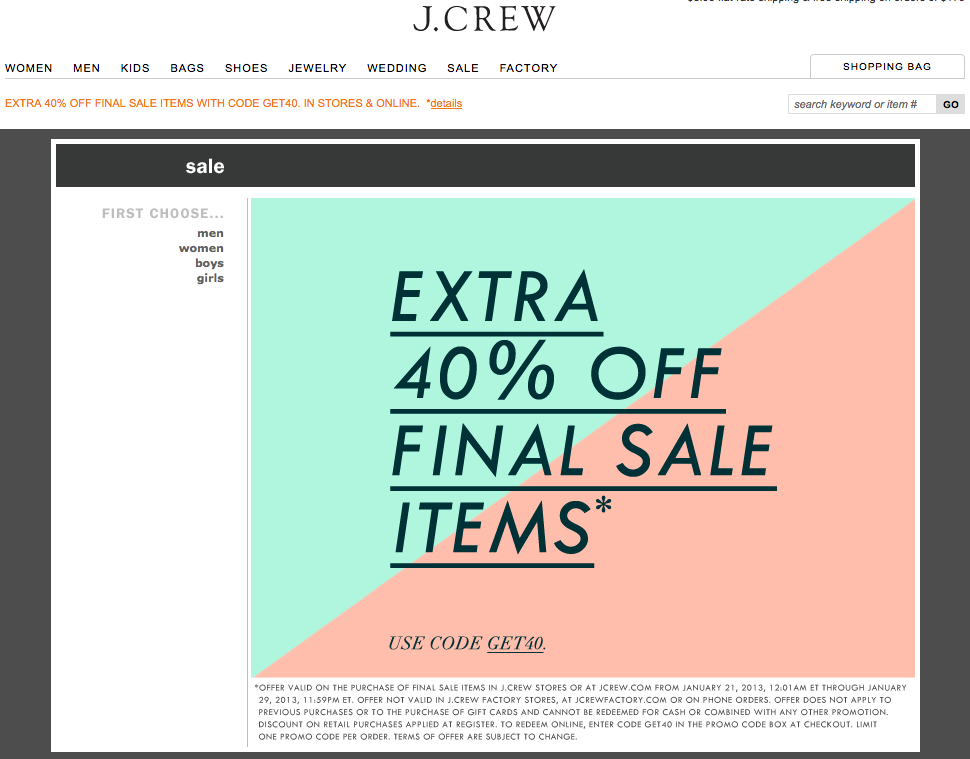
When I clicked the main image, where it says "SHOP NOW>", this is the landing page:


Email Promo #2

Here's what the email piece looked like in my inbox:


When I clicked the "Shop Now >>" button under the main image, this is the landing page:


Which was a hit and which was a miss for you?


 Email Promo #1:
  • Email Headline Offer: "Ends Soon.  Shop our sale, in stores & online."
  • Incentive to act now: "Extra 40% off Final Sale"
  • Fine print: offer valid on purchase of final sale items in stores or online from 1/21/13 - 1/29/13 (4 day purchasing window from date email sent)
  • Visual of items included in promo: N/A
  • Click-through landing page: Same as email promo
  • Promo redemption: Enter code at checkout
  • Steps to redeeming promo: 4 clicks led to an item which was listed as "sold out".  Tried again with different item, 5 clicks to checkout.

Email Promo #2:
  • Email Headline Offer: "40% Special Brownies for Your Valentine"
  • Incentive to act now: "Weekend Special Offer for Valentine's Day"
  • Fine print: offer only valid through 1/27/13 (2 day purchasing window from date email sent)
  • Visual of items included in promo: Three items featured with clearly marked discounted pricing and shop now buttons
  • Click-through landing page: Purchase page for individual item
  • Promo redemption: Prices already adjusted on website to reflect promo
  • Steps to redeeming promo: 3 clicks to checkout
 
For me, the obvious winner is Email Promo #2.  In order for an email promotion to be effective, useful, and actionable - it needs to have all the ingredients that make it easy for people to see:
  • WHY they would want something (for Valentine's day and to take advantage of a special deal)
  • WHO they are buying it for (brownie lovers)
  • WHEN they need to decide (before tomorrow ends)
  • WHAT they should buy (these specific brownies that are on sale and available right now)
  • HOW to close the deal as quickly and easily as possible (with easy to find action buttons and short clicking process to check out)
The next time you decide to create a promotional email campaign for your business- make sure it's a hit by selling your work as clearly, easily, and efficiently as possible!


Anne Ruthmann is a lifestyle & wedding photographer from Boston, MA. She spent 10 years practicing marketing & management in corporate and non-profit businesses before pursuing her passion for photography in 2004 as an independent small business.  She loves helping others find creative and smart solutions to business problems.  Follow her on Twitter to see her daily adventures and thoughts.