Showing posts with label products. Show all posts

Tuesday, January 29, 2019

PhotoShelter Review from a Commercial Photographer

Before deciding to use PhotoShelter in 2016 for my Commercial Architecture & Interior Design Photography business in New York City, I had been a long-time user of Pictage for my Professional Wedding & Portrait Photography business while living in Massachusetts, Indiana, and Michigan from 2005-2015.  Before I had settled on either of these solutions for my photography business, I had investigated a lot of other solutions first.  I mention this just to provide some context and background for my time and experience with professional image vendors in the photography industry.

BEFORE USING PHOTOSHELTER:

When Pictage closed in 2015, I had to scramble to find a way to transfer my 10 years of professional image archives out of that solution and into a new solution.  The quickest answer that I could manage online at the time was to FTP all client image archives from Pictage into Dropbox.  This wasn't the best solution, but it was the solution I had time to manage, along with the help of a virtual assistant that I had hired to make sure the task was completed properly.

My NYC Real Estate, Rental, Architecture, & Interior Design Photography clients had very different needs than my Wedding & Portrait Clients.  Wedding & Portrait clients needed some print fulfillment options for greeting cards, wall prints, framing, sharing images with guests, selecting how private their images would be based on who was looking at them, and album proofing, printing, and binding to help them pull together family and wedding albums.  Commercial clients needed no professional print fulfillment from me, just digital solutions.

Commercial & Residential Real Estate, Rental, Architecture, & Interior Design Photography clients needed to be able to share the images with multiple vendors, have a variety of image licensing options, have a variety of downloading sizes and file types (TIF, JPG, PDF), and have a sense of privacy and control over who could see and access the images. I also needed to be able to store some RAW files to collaborate with retouchers and post-production specialists who were based in other states or cities and give them access to download those files easily.  The total file size needs were not in giga-bytes, but in tera-bytes, so I needed an unlimited image storage solution that could deliver fast uploads and downloads.

In my scramble to find an interim solution, I found that Dropbox was awful for images.  Color accuracy was atrocious, which ruined all the careful white balancing I'd done for commercial architecture and interior clients who spent hours picking out the right colors for their projects and relied on me to nail that color accuracy in photos.  The colors were fine after they were downloaded, or if they were being viewed offline, but online- terrible.  I almost lost some clients over this issue, so I really needed to find another solution other than Dropbox for my commercial clients.

I shopped around comparing various industry photo hosting and storage vendors, and found that many of them were mainly focused on catering to the needs of wedding & portrait photographers.  Which is, after all, one of the largest photography industry markets, so I get it.  Many fewer businesses need professional photography than number of people getting married or having families.

MY FIRST IMPRESSION OF PHOTOSHELTER:

Photoshelter appeared somewhat small in terms of photography market share of users.  They had been slowly and steadily building their platform and it appeared that they were focusing on users that came out of the New York market of clients.  Photojournalists, Fine Art Photographers, and Commercial Photographers dominate the New York photography landscape.  Professional Real Estate and Rental Photography has only exploded in the last 5 years.  Interior Design & Architecture will always remain a very small niche market of photography mainly focused in the top cities of the world.  So the question came down to whether or not Photoshelter had everything I needed as a commercial photographer?  The following is a run-down of what I've found to be good and what can be improved after using PhotoShelter for a couple years.

UNLIMITED STORAGE: *****
Initially, they didn't have an unlimited storage option, so it was tough for me to sign up right away, knowing that I would have limits on the number of files I'd be able to manage on their platform without incurring extra upcharge fees that might be unpredictable.  Luckily, they started offering an unlimited option under $50/mo shortly after I started considering them, which made it much easier for me to bring all of my commercial image needs onto their servers.  I had been paying Pictage $100/mo for unlimited image proofing & storage, but they also provided many other services I needed as well.  I had been paying Dropbox $50/mo for shitty image proofing & storage of only 500GB, so PhotoShelter was a much better choice simply on the unlimited storage to cost ratio and the fact that I could integrate several other things into the same online service.

VARIETY OF IMAGE FILE TYPES: *****
Since I provide different types of image files to different types of clients, I really needed a solution that could handle a variety of image files from RAW to TIF to JPG... and even PDF... and I was happy to find that PhotoShelter was able to manage all of these file types and provide color-accurate online previews of the files no matter what type they were being stored and offered in.  This made my clients happy to see such great color accuracy and quality detail on their images, and it made me happy to not have to explain to every new client that the color and quality would be better on download.  My clients purchased more images because they looked great- which is super important when you enter a realm where images can be licensed one by one for hundreds or thousands of dollars.

PRIVACY & CONTROL OPTIONS: *****
One of the other important factors in commercial work was being able to control who could access the images, who could download the images, what file size and type they could download, as well as how long they would have access to those downloads.  I was happy to see that PhotoShelter had built-in options for offering different file sizes from one original download, as well as giving me the ability to limit who would be able to download based on email or password, and how long they would be able to download, based on expiration date or a one-time download link that lasted a few days.

PORTFOLIO MANAGEMENT: *****
I wasn't really expecting to get a portfolio included with my online image hosting & proofing provider, but with PhotoShelter I did, and it was so easy to drag and drop images from the unlisted proofing side of the website to the listed and visible website portfolio side of the website.  There are also some built-in image SEO tools, watermarking options, and website layouts that make setting up and revising your portfolio as easy as just dragging and dropping from your latest projects.

COMMISSIONS & ONLINE SALES: ***
For photographers who want to keep their money where their images are, PhotoShelter is OK, but it takes a bigger cut of your sales than other solutions.  So, I had to make a decision about whether I was going to run my client invoices and sales through PhotoShelter or continue using other options that I'd already started using after Pictage closed.  Unfortunately the commission and online sales structure through PhotoShelter took too much of a percentage for my tastes.  I'm not giving up 8% of my commercial client invoices, sorry guys.  It might be great for someone occasionally selling fine art, who is comparing another online gallery ownership take of 15-50%, but I came from using a business solution that took no more than 3%, so the 8% commission option on the pro plan was a killer for wanting to use their sales engine for commercial work or invoicing.  I just chose to avoid that entire part of their services completely, since I already had another solution that worked better and gave me more profit from my sales.

CUSTOMER SERVICE: **
I had a very close relationship with Pictage when I was using their service.  They had tiers of customer service response based on how heavily you were invested with them, so pro users and members had no issues talking to someone right away with their pro client concierge service.  They had round tables where they would discuss improvement ideas with power users, so improvement ideas were valued when they came from the community of users.  It was a level of service that feels rare in the online marketplace now.  Anyway, that's what I'm comparing to when I talk about customer service.

Photoshelter has OK customer service.  It exists at a minimum level.  It's still better than Dropbox.  It's still better than a platform solution you need to install and manage yourself.  Even though I've been a pro-member of PhotoShelter for a couple years, the two occasions I reached out for help didn't yield that much help.  If I were a first time online proofing solution user, this might be a problem.  Luckily, their system is mostly streamlined and works quite well in general, so you may not need much customer support.  Just know that it may be limited if you do need that support.  

The Photoshelter office is literally up the street from me, and I've been several times for their community events, so I asked about sitting down with the team to talk about some issues my clients were expressing with regarding to downloading their images.  I knew that these comments could create some great UX improvements, but the support team pretty much came back to me with the comment "we're always working to improve" but no follow-up to actually hear about the ways it could be improved.  They were looking at the system through their experienced eyes and seeing no problems, rather than taking some time to look over the shoulders of some people who weren't photographers or UX designers and who hadn't used their system before and were clicking the wrong buttons at the wrong time and getting the wrong results because of the UX design.  I digress.  It's an area they can improve upon, and I hope they do improve upon it.

At the end of the day, their UX for proofing and downloading images still gave my clients fewer headaches than using Dropbox as an interim solution, so it didn't stop me from using the service.  My design and commercial clients were just mildly frustrated that they kept making the same mistakes when downloading their images because of the way the site was designed.

OVERALL: ****
It is still one of the more robust online proofing & delivery options for commercial photographers.  So yes, I'd recommend it and I think it's a solid solution for professional photographers.  Just go into it knowing that you may need to hand-hold your photography clients through some mild confusion if they miss some steps in the proofing & downloading workflow.

Anne Ruthmann is a retired professional photographer in New York City. With over 13 years of success as a full-time photographer in weddings, portraits, editorial, architecture, and interiors, she spends any extra time she has helping others find smart solutions to business problems. Stay in touch on Instagram, Twitter or Facebook.


Saturday, January 26, 2013

Hit & Miss Email Promotions

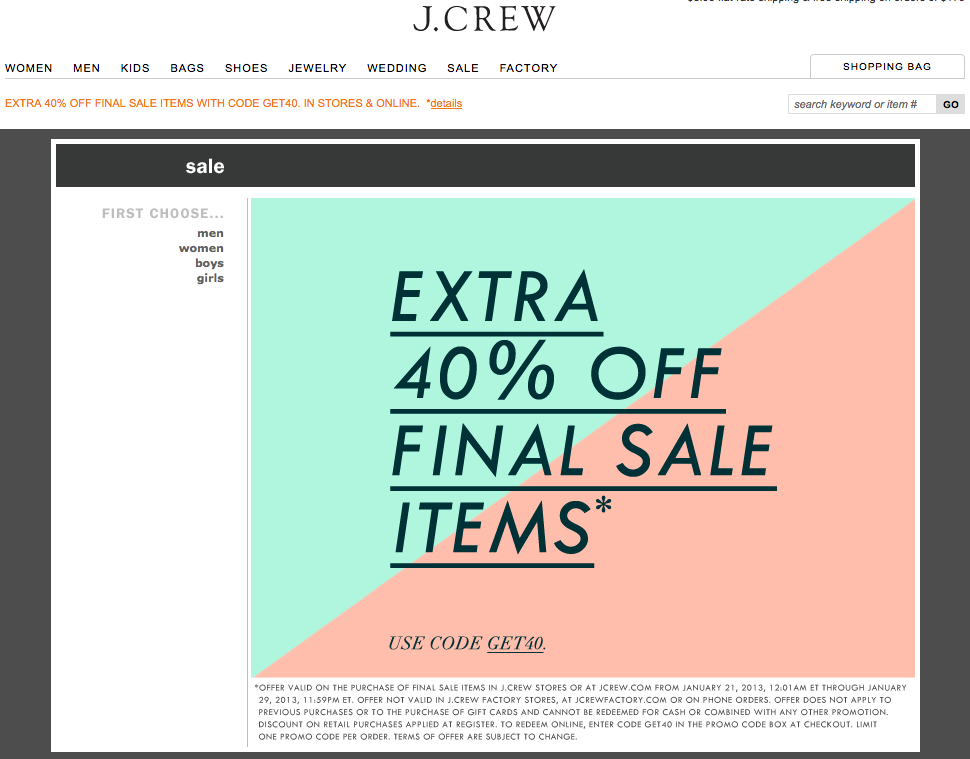
I just so happened to receive two 40% off email promotions on the same day from two different companies.  One was a hit and the other was a miss.  Let's see if you can figure out which was which:

Email Promo #1:

Here's what the email piece looked like in my inbox:
When I clicked the main image, where it says "SHOP NOW>", this is the landing page:


Email Promo #2

Here's what the email piece looked like in my inbox:


When I clicked the "Shop Now >>" button under the main image, this is the landing page:


Which was a hit and which was a miss for you?


 Email Promo #1:
  • Email Headline Offer: "Ends Soon.  Shop our sale, in stores & online."
  • Incentive to act now: "Extra 40% off Final Sale"
  • Fine print: offer valid on purchase of final sale items in stores or online from 1/21/13 - 1/29/13 (4 day purchasing window from date email sent)
  • Visual of items included in promo: N/A
  • Click-through landing page: Same as email promo
  • Promo redemption: Enter code at checkout
  • Steps to redeeming promo: 4 clicks led to an item which was listed as "sold out".  Tried again with different item, 5 clicks to checkout.

Email Promo #2:
  • Email Headline Offer: "40% Special Brownies for Your Valentine"
  • Incentive to act now: "Weekend Special Offer for Valentine's Day"
  • Fine print: offer only valid through 1/27/13 (2 day purchasing window from date email sent)
  • Visual of items included in promo: Three items featured with clearly marked discounted pricing and shop now buttons
  • Click-through landing page: Purchase page for individual item
  • Promo redemption: Prices already adjusted on website to reflect promo
  • Steps to redeeming promo: 3 clicks to checkout
 
For me, the obvious winner is Email Promo #2.  In order for an email promotion to be effective, useful, and actionable - it needs to have all the ingredients that make it easy for people to see:
  • WHY they would want something (for Valentine's day and to take advantage of a special deal)
  • WHO they are buying it for (brownie lovers)
  • WHEN they need to decide (before tomorrow ends)
  • WHAT they should buy (these specific brownies that are on sale and available right now)
  • HOW to close the deal as quickly and easily as possible (with easy to find action buttons and short clicking process to check out)
The next time you decide to create a promotional email campaign for your business- make sure it's a hit by selling your work as clearly, easily, and efficiently as possible!


Anne Ruthmann is a lifestyle & wedding photographer from Boston, MA. She spent 10 years practicing marketing & management in corporate and non-profit businesses before pursuing her passion for photography in 2004 as an independent small business.  She loves helping others find creative and smart solutions to business problems.  Follow her on Twitter to see her daily adventures and thoughts.


Sunday, February 5, 2012

It's Not the Economy, It's You - How To Get Unstuck

It's easy to blame the economy when things are going tough.  However, the fact is that there are still people who survive and thrive no matter what the economic circumstances are.  How do they do it?  They revisit, rework, and retool their strategy to fit the changes happening around them.

If you're feeling like you're in a slump, it's because you're resisting changes you need to make, or you're unable to identify where you have opportunities for change.  

If you're resisting change, than you have already identified what change is needed- but now you need to have an honest conversation with yourself (or your business mentor) about why you aren't motivated to make the changes you know will help your business.  However, if you're simply at a loss for ideas to make changes, here are several ways to change and rework your business:
  • Service Offerings
  • Product Offerings
  • Overhead Costs
  • Workflow Systems
  • Marketing Plan
  • Budgeting
Do any of the items above stand out as something you've been neglecting or know needs improvement?  If so, than you know where you need to focus your energy already.  Below I've provided some basic ideas about how to create change in these areas.  This is in no way an exhaustive or complete list of possibilities, but merely a sample of things I've seen work in various businesses that I've worked with.  As you read these, see which one(s) stand out to you as something you need to do and write them down in a list.  I'll share what to do with your list after you've read through them:

SERVICE OFFERINGS
  • Change business hours to provide added convenience to clients
  • Offer smaller introductory services to allow more people to develop a relationship with your company 
  • Pair down services to focus business strategies, or expand services to reach new markets

PRODUCT OFFERINGS
  • Simplify your product line to make client decisions easier and to streamline production time
  • Expand your product line to offer more customizable, unique, or affordable products for clients
  • Eliminate outdated products and introduce innovative products

OVERHEAD COSTS
  • Eliminate unused or underutilized assets and services with recurring costs
  • Let go of unproductive employees to make room for highly skilled and motivated ones
  • Invest in assets or property that will produce ongoing income

WORKFLOW SYSTEMS
  • Find automated solutions for common repetitive tasks
  • Outsource production or administrative work that is easily reproduced by others
  • Streamline workflow process and production schedules to be more efficient

MARKETING PLAN
  • Create an annual marketing schedule for promotions, social media communication, and newsletter updates
  • Analyze return from previous marketing efforts and eliminate those which do not produce income or measurable results
  • Identify strategic relationships with other brands for partnership marketing opportunities

BUDGETING
  • Analyze spending habits to get a clear picture of where money is going and when- use this information to create a month to month budget for spending
  • Create an annual budget for marketing, equipment, supplies, overhead, labor, etc. to find opportunities to cut back spending or to eliminate unnecessary upgrades
  • Work with an accountant or bookkeeper to help you gain control of the numbers and to keep you financially organized

It would be impossible to do all of these at once, so once you've established a list of the things you feel your business needs, prioritize it from most needed to least needed changes.  The key is to pick just ONE thing you want to focus on changing at a time.  Make that change before moving on to the next.  By making one change at a time, you can give each change your full attention.  Once you've completed a change that benefits your clients, spread the news to reinvigorate your brand and demonstrate growth.  Growth and change attracts positive attention and forward momentum, both of which are great for attracting new business!

Once you know what you're going to start working on first, get additional ideas from PhotoLovecat.com by clicking on a category keyword listed on the right of this blog, or try the search box at the top left of the blog for more posts and ideas.

Anne Ruthmann is a lifestyle & wedding photographer from Boston, MA. She spent 10 years practicing marketing & management in corporate and non-profit businesses before pursuing her passion for photography as an independent small business.  She loves helping others find creative and low-cost solutions to business problems.  Follow her on Twitter or Facebook to see her daily adventures and thoughts.

Wednesday, December 8, 2010

Review: Shootsac

Continuing the trend of my reviews of camera bags, I figured I needed to add my favoritest bag of them all, Shootsac. I use this sucker more than any other bag and I have to say that (bag cost only... we need not discuss my shameful cover habit) this product may have the greatest return of interest out of any product that I've purchased for photography.

Item: Shootsac

Product Website: Shootsac

Price: $179.00

What I Bought Bag For/What I Expected: I purchased this bag because from the get-go in my career I knew two things, one - that I'm klutzy as all heck so I knew there was NO way I could carry two cameras and not drop/bash/break one in the course of the day and two - that I love changing lenses and being forgetful, I'd be apt to leave one behind if I continued my method of leaving the lenses in convenient places. I loved the ads and the raves I heard online about how wonderful it was to carry lenses on you and how easy it was to use. I purchased this bag in early 2008 and have used it on practically every shoot since.

Expectation Met: YES! *wahoo*

Pros:
+ The bag very easily wraps around your body, making it less cumbersome than more traditional camera bags.
+ With the introduction of the shoulder pad (a MUST buy!) it became much more comfortable and easy to carry.
+ The lenses are secure. Two + years later and my lenses still don't wobble or fall out, even though the neoprene has stretched.
+ Cute, cute, cute covers. I try to match my weddings (color wise) and the brides always notice and comment.
+ Cover comes in handy when asking bride to sit anywhere that may mess the dress up.
+ Easy to get in and out of during a wedding.
+ Getting in/out of the bag during a wedding is silent, unlike other bags that have velcro, zippers etc.
+ There are often sales and perks through various times of the year.

Cons:
- The bag is not cheap, nor are the covers and the shipping can be steep (they often have free shipping sales though!).
- Some people have had issues with the 70-200 falling out, personally I haven't *knocks on wood* but it's been talked about enough that it is a concern. I believe though with the newer model the pockets are deeper and that helps the issue.
- It doesn't hold a SLR. I've seen it done but I could never make mine fit.
- You cannot put a lens in with the hood on facing out, can sometimes get the lens in with the hood backwards but not easy to get in/out.
- While it's becoming a bit more male angled with some mantastic covers, it's still a smidge feminine (according to my hubs anyways).
- Some do complain about the bag not sitting up when set down. This isn't a problem that bothers me but is one you should be aware of if this could be a problem for you.

Picture of me shooting in Punta Cana with the Shootsac:


What's in the bag? Nikon 70-200 VR (which is in use here), Nikon 24-70 2.8, Nikon 60 macro, Nikon 85 1.4, CF card wallet, extra camera batteries, iPhone. During the wedding I also will carry my SB-900 and battery backup (with the battery backup going into a pocket with the flash on the camera).

Corey Ann is a wedding & lifestyle photographer from North Canton, OH. She is a mix of everything - fashionista (runs Clothes for Pros, clothing suggestions for photographers), travel guru, deal hound and geek rolled into one. She's had a website online since 1997 and a blog since 1999. When not plotting world domination or her next trip, she can be found reading one of the 100+ books she reads a year. Follow her on Twitter.

Sunday, March 29, 2009

Photo Requests vs. Actual Purchases

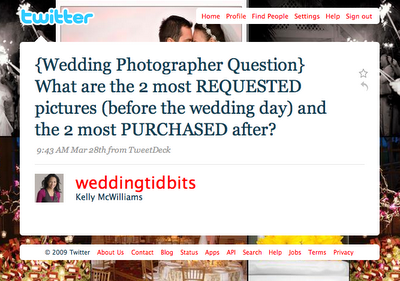
In a recent Twitter discussion, @weddingtidbits asked the question:
weddingtidbits question on twitter

Several photographers responded and the answers were posted on http://weddingsbysocialites.blogspot.com

What you'll see is that clients tend to ask for images that they think are missing from your portfolio. If you show mostly candid work, they'll ask for posed images. If you show mostly posed and detail work, they'll ask for more candid images. Meaning that no matter what your clients are attracted to in your work, they still expect you to be able to do everything well and to be able to deliver it all in a final product.

What was most interesting was that many photographers agreed that the posed images were the most purchased. This may be because posed images are often what we think we look best in, however, what I've learned over time is that most people simply order photos of themselves. So, if the only images you have of a person are the ones of them in a posed group, than that's the photo they'll order. However, if you have some really amazing dance floor shots or really flattering candids throughout the night, you'll likely get an order for those photos as well. If you have a photobooth corner at a reception, you'll likely get many orders from that as well. I also find that most online purchases are from guests who likely won't have access to the disc that the bride & groom will eventually receive (if you've included that in your collection.) Which is why it's also very important to make sure guests are able to access those online images in a way that is quick and convenient for them.

This begs the question: Do the things that people order affect what you photograph on the wedding day? Does the way you put your albums together affect how you photograph the wedding day? How much income are you missing out on based on how you've decided to capture an event? Is your pricing/ordering structure set up to make it easy and profitable for these kind of purchases to take place?

Everyone's business is different, which is why I don't believe that there's one right or wrong answer. What has worked best for you? Do you plan to make any changes for the future? I'd love to hear your thoughts!

Anne Ruthmann is a lifestyle & wedding photographer from Boston, MA. She spent 10 years practicing marketing & management in corporate and non-profit businesses before pursuing her passion for photography as an independent small business. She loves helping others find creative and low-cost solutions to business problems. Follow her on Twitter to see her daily adventures and thoughts.

Tuesday, October 2, 2007

Lovecat: Pay It Forward

Normally I wouldn't dedicate an entire post to just one other blog - but when Bonnie Creevy told me about the Pay It Forward Photo Blog, I felt as though it was definitely worth it's very own post since we share the same philosophy about helping others: to give freely, while asking nothing in return. ;-) The Pay It Forward Photo Blog is full of FREE photoshop actions, design templates, downloads, inspiration contests, interviews, etc. An amazing resource of freebies!!

Here are some of the recent downloads that were featured on the blog...
Swirly Border from Lindsey...


Christmas Card from Renee...


Chocolate Action from Heather....


What are you waiting for?! Visit the Pay It Forward Photo Blog now!! And if you happen to find it useful, hopefully you'll be able to give a little something back to those who helped you!!

Wednesday, September 19, 2007

Graphic Design Templates for Photos

You spend so much time making your images perfect that there's often little time to also come up with graphic designs that will really make your work stand out! Thank goodness there are graphic designers out there who understand photography and are offering templates and designs so that you can just plug your images into something that's already simply fabulous!! Whether it's a holiday card, baby announcement, save-the-date, wall collage, graphic mat or border, marketing brochure, or even album templates, the following links are full of great ready-to-go design templates! I'm sure there are MANY more options out there, so please feel free to share great resources you know of in the comments!


Thanks to Jennifer Driscoll and ilovephotography.com for help with acquiring these resources!

Friday, April 20, 2007

Royalty Free Music Resources

Before you use any resource, always make sure you check the usage rights so that you understand the limitations of each agreement.

Triple Scoop Music - a fairly large collection of great music from around thet globe, including popular musicians and grammy winning artists.

Stock 20 - search by genre, latest upload, or even featured artists

Red Beard Music - a site for more popular music artists to offer their music for a limited annual license at a very reasonable price.

StockMusic.net - searchable database of royalty free music, available by individual download or as a discounted set

Pump Audio - from Getty Images comes great artists and music for purchase and download

Royalty Free Music - subscribe, download tracks, or buy a CD of royalty free music

ShowIT Music - David Jay is passionate about finding and offering cool music that is royalty-free for photographers and videographers to use professionally

Soundtrack Arcade - a growing archive of royalty free music for a variety of genres

Granite Audio Pro - dedicated to professionally composed royalty free music for photographers and videographers

Music Bakery - a one time subscription with unlimited downloads

TrueTone Productions - pay per song acoustic instrumental tracks

PD Info - royalty free music library arranged by genre and ideal uses

Pod Safe Music Network - one of the largest collections of creative commons liscense music and artists

Pod Safe Audio - unsigned artists share their music for download

Thursday, March 1, 2007

Professional Photographer Album Resources

Professional albums can be one of the most overwhelming things to figure out because there are so many options out there. My biggest advice to someone wishing to carry albums is to keep it simple. Find an album that works best with your style and stick with it (provided they have good turn around times, customer service, and quality). Most clients aren't concerned with which album maker you use, because they trust you are providing them with a quality product. If you're going to offer several different albums, make sure you know why you're offering those options, and what they say about you and your business. It may be a good idea to offer an inexpensive coffee table album if you're dealing with clients who are on a budget, and it may be a good idea to offer something that's highly customizeable if you're dealing with clients who will pay to have something unique. Know your clients, know your style, and choose your album(s) based on that knowledge. With that said, here are some album resources for you! I'll update this list over time as I learn of new resources. Feel free to leave comments about your favorites as well!

BINDING
There are several different types of binding which will have an effect on how your images appear in the album, as well as how your clients will handle the album. (Please note: the terms used below are not standard book binding terms.)
  • Pinched Glue Binding: double sided printing on single pages are stacked together and glued down one edge creating a "pinched" binding. Parts of the image will disappear into the center of a two-page spread and the book will not lay flat when it is opened. This type of binding is most common with paperback or softcover books as the pages need to be glued to the cover to reinforce the strength of the binding. People tend to hold this book in one hand, and then flip throgh the pages with the other - similar to how they would view a magazine. (This can also be referred to as a "perfect" binding.) It has become more common to see in hardcover books recently, but due to the binding, it may come apart more easily in a hardcover book.
  • Stiched Book Binding: most often used with hardcover library books is a stiched binding which clumps multiple pages (double sided and printed as 2-page spreads) together and then stiches them with thread to a binding tape. These books may lay flat when open if the cover binding is structured for that use. Depending on the size and weight of this book, it is either handheld or laid flat with pages turned one by one- faster or slower depending on the perceived delicacy of the pages.
  • Folded Page "W" binding: pages are printed on a single side as a two-page spread, are folded, and then bound together by gluing each page to the next. Reinforcement is given to the spine by gluing the spine to a binding tape which gives the pages flexibility to lay flat when opened. These books are often a little too heavy and stiff to simply hold and flip through, so they are often laid out flat and viewed as full spreads.
COFFEE TABLE ALBUMS These albums have images printed directly onto a double sided, flexible, thin page. Most common printing for a coffee table album is CMYK or InkJet. Binding is either stitch book binding or pinched glue binding. Advantages: very affordable, lightweight, thin page thickness allows for many pages. Disadvantages: less durable over time, colors may vary in printing, clients have easy access to similar albums which may affect their perception of the overall value of this product.
Here's a video from The Wedding Travelers on the difference between a Coffee Table Abum (Asuka) and a Flush Mount Coffee Table Album (VisionArt)... FLUSH MOUNT COFFEE TABLE ALBUMS This is somewhat of a hybrid product in that its pages are thinner than a flush mount library album, but are thicker than a coffee table album. The printing is often done on either true photographic paper or on a dense fine art paper. Each page is printed one sided and is then scored and the pages are glued together to give each page more strength. Advantages: accurate photographic color, medium page thickness allows for more pages. Disadvantages: images may deteriorate over time in the scored creases.
FLUSH MOUNT LIBRARY ALBUMS This album most often consists of photographic pages which are permanently mounted to a dense cardstock or plastic page, resulting in very thick pages. Photographs can be split in the center of a spread to avoid creasing distortion. Advantages: very durable pages, books are more likely to lay flat when open due to binding. Disadvantages: number of pages are often limited due to the thickness, albums can be very heavy (this could also be perceived as an advantage when considering perceived value of product.)
Here's a video from Lori Compass on YouTube, showing an example of a Flush Mount Library Bound Album with a collage design... MATTED ALBUMS Even though we group all matted albums together, there are actually different types of matted albums for you to consider. There's a slip-in matted album which allows you to order your mats and album in advance and you simply fill in the holes with your images, and then there's a mounted matted album which requires you to send the prints to the album maker who then mounts the prints into the mats for you, or creates custom mats for your images.
CUSTOM ALBUMS These album makers don't exactly fit into one of the boxes above. They provide custom products for clients who value originality and customization and are willing to pay extra for that luxury.
SELF-MOUNT Self-mount albums can either look like matted albums or flush mount albums, but the basic principal is that you actually mount the images yourself. This is a product which you can purchase in advance and then create a custom album almost on the spot for a client.
Here's an example of a self-mount album, with slip lock pages.. ALBUM DEALERS
ALBUM DESIGNERS
ALBUM DESIGN SOFTWARE
PHOTOSHOP ACTIONS & TEMPLATES FOR ALBUM DESIGN
ALBUM DESIGN DVD TUTORIALS
DIY ALBUM CONSTRUCTION w/ John Michael Cooper The example shown is how to create a flushmount coffee table album.

Wednesday, February 14, 2007

Photoshop Actions for Photographers

There are a lot different Photoshop Actions you can purchase or download for free out there, so here's a one-stop-shop for photographers. If there are actions you think everyone should know about - post a comment and share your favorites!